

Free Nutanix NCP-EUC Exam 2025 Practice Materials Collection
NCP-EUC Exam Info and Free Practice Test All-in-One Exam Guide Mar-2025
To earn the NCP-EUC certification, candidates must pass a rigorous exam that tests their knowledge of Nutanix infrastructure for end-user computing solutions. NCP-EUC exam is designed to evaluate candidates' ability to deploy, manage, and support Nutanix infrastructure, as well as their understanding of desktop and application virtualization, end-user management, and endpoint security. Successful completion of the exam demonstrates that a candidate has the skills and knowledge necessary to design, deploy, and manage Nutanix infrastructure for end-user computing solutions.
The NCP-EUC exam covers a range of topics, including Nutanix VDI architecture and design, desktop image management, application delivery, and user environment management. Candidates must demonstrate their ability to deploy, configure, and manage Nutanix VDI solutions, as well as troubleshoot common issues that may arise in these environments. Nutanix Certified Professional - End - User Computing certification exam also covers topics related to security, compliance, and data protection, ensuring that candidates have a well-rounded understanding of best practices in end-user computing. By earning the NCP-EUC certification, IT professionals can demonstrate their proficiency in Nutanix VDI solutions and enhance their career prospects in the IT industry.
NEW QUESTION # 35
An administrator has created a Prism Central Playbook Action named Virtual Desktop Add CPU to add 2 vCPU to virtual desktop when an alert is triggered after the virtual desktop's CPU usage has exceeded 80%.
Initially the Playbook Action works as expected, however over time it seems it is no longer being triggered.
What is causing this issue?
- A. Additional vCPUs need to be registered.
- B. The vNUMA boundary has been breached preventing more vCPUs to be added.
- C. The virtual desktop CPU Usage alerts were not cleared.
- D. There are no more CPUs availed to allocate to the VM.
Answer: C
Explanation:
https://next.nutanix.com/community-blog-154/new-x-play-actions-in-prism-central-2021-7-40005 The Prism Central Playbook Action is a tool that allows you to automate tasks based on triggers, such as events, alerts, or webhooks. You can define a series of actions (called a playbook) that perform operations on your infrastructure, such as adding or reducing resources on a VM2.
To use the Playbook Action for VMs, you need to meet some prerequisites, such as:
The Prism Central version must be 2020.11 or later.
The AOS version must be 5.15 LTSR or later.
The hypervisor must be AHV or ESXi.
The VMs must have Nutanix Guest Tools (NGT) installed and enabled3.
One of the possible reasons why the Playbook Action is no longer being triggered is that the virtual desktop CPU Usage alerts were not cleared. According to the Prism Central guide3, "If an alert has been triggered once and has not been cleared yet, then it will not trigger any action again until it has been cleared". Therefore, if the CPU Usage alert remains active for a virtual desktop, it will prevent the Playbook Action from adding more vCPUs to it.
NEW QUESTION # 36
The administrator has checked the logs to see the below output:
The API call sent to the VM via XD Plugin at [CDF logs]:
Following that while the VM is being powered OFF, query for the current VM state results in ON (the administrator sees a number of these until the VM is marked as power OFF) logs]:
Upon further review the administrator notices in COF logs, after a number of queries for the machine state, one results in a conflicting state, reporting the Power state as ON anc OFF [CDF logs) HCM should the administrator resolve the issue?
- A. Increase the distribution time in Machine Update Rollout
- B. Delete Scheduled reboot settings
- C. Create a Scheduled reboot cycle.
- D. Decrease the distribution time in Machine Update Rollout
Answer: C
NEW QUESTION # 37
The operations team have been tasked with increasing overall datacenter efficiency with a target minimum of 80% CPU, memory, and storage capacity utilization. They are requesting usage data from all application owners be sent on a monthly basis to be ingested into their capacity management software.
An administrator has an implementation of four Nutanix clusters under the management of a single Prism Central Instance.
How should the administrator best provide the data needed to the operations team to ensure adherence to the datacenter utilization directive?
- A. Export the CPU Memory end Storage Usage metrics under Virtual Infrastructure/VMs in Prism Central and FTP the file to the operations team's FTP server.
- B. Schedule a monthly email report with CPU, Memory, and Storage Usage data across all clusters under the Reporting facility in Prism Central.
- C. Create a Metric Chart in Prism Central with CPU, Memory, and Storage usage across all clusters and export the data to be sent to the operations team,
- D. Review the VM Efficiencies widget in Prism Central and export the data to a comma delimited file to be sent to the operations team.
Answer: B
Explanation:
This option allows you to create a custom report with the required metrics for all VMs across all clusters and send it automatically to the operations team via email4. This way, you don't have to manually export or FTP the data every month.
NEW QUESTION # 38
An administrator has finished setting up a Frame environment and has to finish preparing the Sandbox image. During the publishing andtesting phase, the administrator notices issue with the Sysprep process.
Which tool can the administrator use to prepare the Sysprep of the sandbox with error parsing?
- A. Windows Sysprep Built in tool
- B. Frame Sysprep Helper Tool
- C. Frame Guest Agent 8
- D. Frame Guest Agent 7
Answer: B
Explanation:
Sysprep is a Microsoft tool that prepares a Windows installation for cloning, auditing, and customer delivery23. The Frame Sysprep Helper Tool is designed to simplify the Microsoft Sysprep process by parsing errors reported by sysprep and immediately repairing them when possible1. Therefore, the tool that the administrator can use to prepare the Sysprep of the sandbox with error parsing is A (Frame Sysprep Helper Tool).
NEW QUESTION # 39
What are two types Of Frame environment delivery models? (Choose two.)
- A. Frame on HP running Hyper-V.
- B. Frame on Cisco LICS running VMware ESXi
- C. BYO public cloud
- D. Nutanix private cloud model running AHV
Answer: C,D
Explanation:
Frame is a cloud-native desktop-as-a-service platform that allows you to deliver virtual desktops and applications from any cloud. Frame supports multiple public clouds, such as AWS, Azure, GCP, and Alibaba Cloud2. You can bring your own public cloud account and use Frame to provision and manage your virtual desktops on demand.
Frame also supports Nutanix private cloud model running AHV, which is a native hypervisor for Nutanix Enterprise Cloud Platform. You can use Frame to deliver virtual desktops and applications from your own data center using Nutanix AHV clusters3. You can benefit from the simplicity, scalability, and performance of Nutanix hyperconverged infrastructure.
NEW QUESTION # 40
A previous administrator provisioned all of the virtual desktops in a virtual desktop Nutanix cluster using the following specifications:
* 6 vCPU
* 8 GB Memory
* 300 GB HDD
How can the current administrator best prepare next fiscal year's budget using Prism Central?
- A. Execute a Calm blueprint to add additional desktops.
- B. Review the most recent in Audits.
- C. Review most recent in Tasks.
- D. Execute Capacity Runway scenario.
Answer: D
Explanation:
In Nutanix Prism Central, the Capacity Runway scenario provides details on the available capacity for the next
12 months based on the current usage pattern. This feature can help the administrator to plan and prepare the budget for the next fiscal year. The administrator can use this information to decide whether more resources need to be added to the Nutanix cluster or if the existing resources are sufficient.
https://www.nutanix.com/products/prism/prism-central
Prism Central planning tools can help you estimate the capacity runway of your cluster by considering the storage, CPU, and memory capacity. However, you need to have at least 21 days of data from a cluster to calculate the baseline runway estimates4.
NEW QUESTION # 41
An administrator supports a user group that spans across 10 Nutanix clusters for a medium-sized medical communications firm. The 10 Nutanix clusters are managed by a single Prism Central instance.
This group's virtual desktops are all cloned from a common gold image and all applications are published from a Citrix Virtual Apps farm. The administrator needs to keep the gold image in sync across all of the clusters.
What is the best way to achieve this?
- A. Setup a Protection Domain with the gold image as 3 protected entity.
- B. use the native replication facility within the Machine Catalog
- C. use Move to maintain all gold images across the clusters.
- D. Upload the gold image to Prism Central Image Service.
Answer: D
Explanation:
Prism Central Image Service allows you to upload and manage images through Prism Central by using the v3 API. You can also choose where your images will be available across different clusters123
https://next.nutanix.com/ncm-intelligent-operations-formerly-prism-pro-ultimate-26/prism-central-adding-image
NEW QUESTION # 42
The operations team have been tasked with increasing overall datacenter efficiency with a target minimum of
80% CPU, memory, and storage capacity utilization. They are requesting usage data from all application owners be sent on a monthly basis to be ingested into their capacity management software.
An administrator has an implementation of four Nutanix clusters under the management of a single Prism Central Instance.
How should the administrator best provide the data needed to the operations team to ensure adherence to the datacenter utilization directive?
- A. Export the CPU Memory end Storage Usage metrics under Virtual Infrastructure/VMs in Prism Central and FTP the file to the operations team's FTP server.
- B. Schedule a monthly email report with CPU, Memory, and Storage Usage data across all clusters under the Reporting facility in Prism Central.
- C. Create a Metric Chart in Prism Central with CPU, Memory, and Storage usage across all clusters and export the data to be sent to the operations team,
- D. Review the VM Efficiencies widget in Prism Central and export the data to a comma delimited file to be sent to the operations team.
Answer: B
Explanation:
This option allows you to create a custom report with the required metrics for all VMs across all clusters and send it automatically to the operations team via email4. This way, you don't have to manually export or FTP the data every month.
NEW QUESTION # 43
An administrator wants to allow Citrix MCS integration with AHV.
Which component needs to be installed and where should it be deployed?
- A. Nutanix AHV MCS Plug-in on Citrix XenDesktop DC
- B. Citrix Desktop DC Plug-in on Prism Element
- C. Nutanix AHV MCS Plug-in on Prism Central
- D. Citrix MCS AHV Plug-in on AHV
Answer: A
Explanation:
According to Nutanix Support & Insights3, you need to install the Nutanix AHV plugin for Citrix Virtual Apps and Desktops on Delivery Controllers (also called the MCS plugin SDK) to create and manage Citrix-provisioned VMs in a Nutanix AHV infrastructure environment.
NEW QUESTION # 44
What is one key benefit of using Nutanix Validated Designs (NVD) for Citrix VDI deployments?
- A. Provides sizing guidance and scaling capabilities.
- B. NVD-based deployments are designed to provide 99.999% up time.
- C. NVD-based deployments are designed to provide Disaster Recovery
- D. Determines performance impact during peak I/0
Answer: A
Explanation:
Nutanix and Citrix provide a turnkey validated VDI infrastructure solution that allows 10x faster deployments, cuts management time by 70% and significantly reduces the number of support calls. Nutanix eliminates the complexity of managing discrete storage, servers and separate virtualization and networking stacks.
https://webobjects2.cdw.com/is/content/CDW/cdw/on-domain-cdw/brands/bitdefender/vdi-application-virtualiza
NEW QUESTION # 45
A company wants their Nutanix VDI environment to have these characteristics:
* 3000 non-persistent desktops
* 500 RDSH-based VMS
* 100 AppStacks
How many storage containers should an administrator create to satisfy these requirements?
- A. 1 storage container for the non-persistent desktops and RDSH-based VMs, and 1 container for the AppStacks
- B. 2 storage containers with deduplication
- C. 1 storage container for all workloads
- D. 1 storage container for the non-persistent desktops, I storage container for the RDSH-based VMs, and 1 container for the AppStacks
Answer: A
Explanation:
Nutanix offers a solution that delivers virtual apps and desktops in one click. Nutanix supports both persistent and non-persistent VDI deployments, as well as RDSH-based VMs and AppStacks.
Storage containers are logical units that group vDisks and apply storage policies such as replication factor, encryption, compression, deduplication and erasure coding3. Nutanix recommends using compression and deduplication to reduce storage usage and avoid duplicate data4.
NEW QUESTION # 46
An administrator is trying to add a Nutanix cluster as a new connection, but connection name Nutanix AHV is not listed in the Connection type menu.
What should the administrator do to resolve this issue?
- A. Install the Nutanix AHV plugin for Citrix Director on Storefront Servers.
- B. Install the Nutanix AHV plugin for Citrix controllers.
- C. Install the Nutanix AHV plugin for Citrix on all Storefront.
- D. Install the Nutanix AHV plugin for Citrix Director on Delivery controllers.
Answer: B
Explanation:
This is because this option will enable the administrator to add a Nutanix cluster as a new connection by installing and registering the plugin on the Delivery Controllers that manage the connection type menu.
https://portal.nutanix.com/page/documents/solutions/details?targetId=BP-2079-Citrix-Virtual-Apps-and-Desktop
NEW QUESTION # 47
A group of developers are migrating from physical computers to persistent virtual desktops.
What is the recommended migration path?
- A. Deploy non-persistent desktops and install required applications.
- B. Convert the developers profile to a roaming profile.
- C. Convert the physical computers to virtual desktops,
- D. Deploy a base image and provision required hosted applications
Answer: C
Explanation:
persistent virtual desktops are virtual desktops that retain their state and configuration across sessions.
This means that users can customize their virtual desktops with their own applications, settings, and data, and have them available every time they log on.
Persistent virtual desktops are suitable for users who need a consistent and personalized experience, such as developers.
According to Nutanix best practices2, one of the recommended migration paths for persistent virtual desktops is to convert the physical computers to virtual desktops.
This can be done by using a tool such as VMware Converter or Microsoft Disk2vhd to create a virtual disk image of the physical computer's hard drive.
Then, this image can be imported into Nutanix Cloud Platform and used as a base image for creating persistent virtual desktops.
This migration path can preserve the existing applications, settings, and data of the physical computers and minimize the disruption for the users.
NEW QUESTION # 48
An administrator is using a mix of full clones and nan-persistent desktops deployed via Citrix MCS on a three-node cluster. The full clone and non-persistent desktops are managed using separate storage containers.
Which two Storage Efficiency features will provide better storage efficiency and performance improvement? (Choose two.)
- A. RDMA
- B. Deduplication
- C. Compression
- D. Erasure Coding
Answer: B,C
Explanation:
Storage Efficiency features that will provide better storage efficiency and performance improvement for a mix of full clones and non-persistent desktops deployed via Citrix MCS on a three-node cluster are Compression and Deduplication. Compression is a technology that reduces the size of data blocks by removing redundant information. Deduplication is a technology that eliminates duplicate blocks of data and reduces storage consumption. Both Compression and Deduplication can be enabled on a per-container basis and can provide significant savings for Citrix virtual desktop deployments that use cloning technologies such as MCS2.
NEW QUESTION # 49
An administrator needs to apply changes via Active Directory Group Policies for an environment using Office365 in Cache Exchanged mode on VMware Horizon.
Which profile management toolset will provide the most effective solution?
- A. Citrix Profile Management
- B. Microsoft FSLogix Profile Management
- C. Liquidware Profile Management
- D. AWS WorkSpaces Profile Management
Answer: B
Explanation:
VMware Horizon is a solution that delivers Windows and Linux virtual desktops and published applications to end users from centralized servers.
One of the best practices for delivering Microsoft Office 365 in VMware Horizon is to disable Cached Exchange Mode for Outlook3. This can improve performance and reduce storage requirements.
There are different profile management toolsets that can be used with Office 365 and VMware Horizon. One of them is Horizon Persona Management4, which is a feature that synchronizes user profiles with a remote repository and provides a personalized desktop experience.
Another option is FSLogix Profile Management5, which is a Microsoft solution that enhances Office 365 performance in non-persistent VDI environments by redirecting user profiles to virtual disks.
https://techzone.vmware.com/resource/best-practices-delivering-microsoft-office-365-vmware-horizon
NEW QUESTION # 50
A company has deployed Horizon on a Nutanix cluster running the ESXi hypervisor. They are starting the configuration for the deployment of 1000 virtual desktops running Windows 10 in a Linked Clone Desktop Pool.
The company has these requirements:
* Reduced time for initial virtual desktop deployment
* Fast recompose time when updating the pool with patches and new application installs
* Provide a high level of availability to the pool
What should the company enable, that will allow this Nutanix VDI implementation to meet the stated requirements?
- A. View Composer API for Array Integration
- B. Separate datastores for replicas and clones
- C. VM disk space reclamation
- D. View Storage Accelerator
Answer: A
Explanation:
View Composer API for Array Integration (VCAI) is a feature of VMware Horizon that leverages the native cloning abilities in the storage array to offload storage operations within a VMware View environment12. This feature allows customers to offload the creation of linked clones to the storage array3.
NEW QUESTION # 51
An administrator has been given a new support role for a group of 1000 users, which are all running Windows 10 Linked Clone virtual desktops, The administrator learns quickly that the environment has been undersized with constant complaints from the user community around running out of storage. The administrator further discovers that the environment is memory constrained.
Which feature should the administrator enable to help relieve the capacity issue?
- A. Auto-tiering
- B. Deduplication
- C. Compression
- D. Erasure Coding
Answer: B
Explanation:
Deduplication is a process that eliminates duplicate data blocks and reduces the amount of storage space required for virtual desktops. Deduplication can be enabled at both cluster level and container level on Nutanix.
Deduplication can also work with VCAI (View Composer Array Integration), which is a feature that uses Nutanix native NFS snapshot technology to clone VMs2. VCAI can improve performance and reduce storage consumption for linked-clone desktop pools.
Another feature that can help with capacity issue is Shadow Clones, which is a distributed caching mechanism that allows multiple VMs to read from a single vDisk copy stored locally on each node3. Shadow Clones can reduce network traffic and improve boot times for virtual desktops.
https://www.nutanix.com/support-services/training-certification/certifications/certification-details-nutanix-certified-professional-ncp-euc-v6
NEW QUESTION # 52
An administrator is using Citrix Studio to configure policies for their existing CVAD environment on to a Nutanix Files share. The administrator would like to use Citrix Director to reset user profiles.
How should the user profiles be configured?
- A. use Nutanix Files standard shares
Deploy Citrix Profile Management user stores inside the user's top-level directory - B. Redirect user's Desktop, Documents and Favorites to a Nutanix Files general share.
- C. Redirect user's Desktop, Documents end Favorites to a Nutanix Files home share.
- D. use Nutanix Files distributed shares.Deploy Citrix Profile Management user stores inside the user's top-level directory.
Answer: D
Explanation:
This is because this option will allow the administrator to use Citrix Director to reset user profiles on a Nutanix Files share that provides high performance, scalability, and resilience3.
Citrix Profile Management is a solution that allows administrators to manage user profiles and settings across different devices and sessions12. Nutanix Files is a software-defined file storage solution that provides high performance and scalability for file data12. Nutanix Files supports all forms of profile management with efficient metadata caching techniques that optimize for faster VDI logon times12. Nutanix Files offers two types of shares: standard shares and distributed shares3. Standard shares are hosted on a single file server, while distributed shares are hosted on multiple file servers for load balancing and high availability3.
https://portal.nutanix.com/page/documents/solutions/details?targetId=BP-2079-Citrix-Virtual-Apps-and-Desktop
NEW QUESTION # 53
Refer to the exhibit.
An administrator is deploying an Instant Clone desktop pool on an 8-node Nutanix cluster. The system displays a warning message, as shown in the exhibit.
What should the administrator do to resolve the issue?
- A. Safely ignore this warning
- B. Disable Shadow Clones
- C. Enable View Storage Accelerator
- D. use both VSA and Shadow Clones
Answer: B
Explanation:
Shadow Clones are a unique feature of the AOS storage that enables distributed caching of virtual disks (vDisks) used by virtual machines1. Shadow Clones provide effective caching optimization in distributed multireader scenarios, such as large VDI and cloud deployments2.
The warning message you see indicates that Shadow Clones are disabled on your Nutanix cluster. This may affect the performance of your Instant Clone desktop pool, as it will not benefit from the caching optimization provided by Shadow Clones.
https://portal.nutanix.com/page/documents/solutions/details?targetId=TN-2100-Performance-Analysis-Nutanix-S
NEW QUESTION # 54
An administrator needs to manage the virtual desktop environment for a small QA group.
Which two requirements would prevent a non-persistent deployment? (Choose two.)
- A. users need to log on and log off frequently.
- B. users need to test application installation routines.
- C. users need to access web-based applications.
- D. users need to test various peripherals.
Answer: B,D
Explanation:
non-persistent VDI is a type of virtual desktop infrastructure (VDI) that does not save any changes made by the user on the virtual machine (VM) across sessions. Non-persistent VDI uses a master image to create and delete VMs as needed.
Therefore, if the administrator needs to manage a non-persistent deployment, they should avoid any requirements that involve modifying or installing applications on the VMs, as those changes would not be saved.
https://www.nutanix.com/support-services/training-certification/certifications/certification-details-nutanix-certifi
NEW QUESTION # 55
Refer to the exhibit.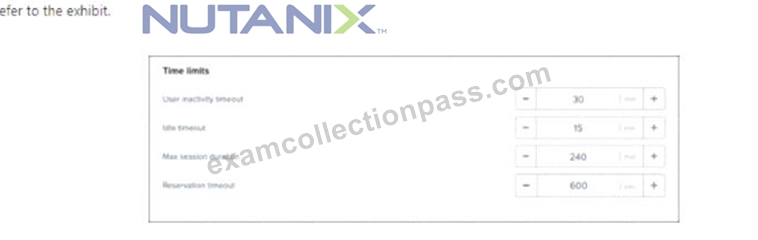
An administrator was made aware that user sessions are being randomly disconnected. and their applications and files being terminated. When the user launches new virtual desktop session, they are authenticated to a fresh desktop. upon investigating. the administrator discovers that most users log in at 9:00 AM and are active through 2:00 PM.
What configuration setting must be modified in order to resolve this issue?
- A. Reservation timeout
- B. Idle timeout
- C. Max session duration
- D. user inactivity timeout
Answer: C
Explanation:
Nutanix Frame has several session settings that can affect the user experience and resource utilization. One of these settings is Max session duration, which defines how long a user can stay connected to a Frame session before it is automatically terminated1. If this setting is too low, users might experience random disconnections and lose their applications and files.Therefore, the configuration setting that must be modified in order to resolve this issue is A (Max session duration).
NEW QUESTION # 56
Users are being prompted to restart their non-persistent desktops in the middle of the day.
which setting in the gold image would cause this to occur?
- A. The mandatory Windows profile is set to v4,
- B. Windows Update policy is set to Automatic.
- C. The power profile turns the screen off after 10 minutes.
- D. Java automatically checks for updates every' 24 hours.
Answer: B
Explanation:
non-persistent VDI machines are deleted when they are rebooted, logged off, or shut down. Therefore, Windows Update policy should be configured to prevent automatic updates that may trigger a restart on these machines1.
https://techcommunity.microsoft.com/t5/microsoft-defender-for-endpoint/onboarding-and-servicing-non-persiste
NEW QUESTION # 57
......
Earning the NCP-EUC certification can help IT professionals advance their careers by demonstrating their expertise in Nutanix EUC solutions. It is also a valuable credential for organizations that use Nutanix technology to ensure that their IT staff has the necessary skills and knowledge to manage and maintain their EUC environments.
Pass Nutanix NCP-EUC Actual Free Exam Q&As Updated Dump: https://www.examcollectionpass.com/Nutanix/NCP-EUC-practice-exam-dumps.html
Latest NCP-EUC Actual Free Exam Updated 79 Questions: https://drive.google.com/open?id=196l4ypE_Ib5VJEDZonk_V6S2uLOP-92y