

2025 ExamcollectionPass CompTIA 220-1102 Dumps and Exam Test Engine
CompTIA 220-1102 DUMPS WITH REAL EXAM QUESTIONS
CompTIA A+ Certification Exam: Core 2 is ideal for individuals who are looking to start a career in IT, or for those who are already working in the field and want to validate their skills and knowledge. 220-1102 exam is designed to test the candidate's ability to work with hardware, software, networks, and security. Candidates who pass the exam can pursue careers such as IT technician, support specialist, help desk analyst, and network support technician.
CompTIA A+ Certification is an industry-recognized credential that validates the skills and knowledge required of entry-level IT professionals. CompTIA A+ Certification Exam: Core 2 certification is divided into two exams: the CompTIA 220-1001 (CompTIA A+ Certification Exam: Core 1) and the CompTIA 220-1002 (CompTIA A+ Certification Exam: Core 2). The latter, 220-1102, focuses on the installation and configuration of operating systems, expanded security, software troubleshooting, and operational procedures.
NEW QUESTION # 135
A technician downloaded an OS installation file but is unable to run it. When the technician tries to open the file, a message indicates no software is installed to run this file. Which of the following should the technician do next to attempt to access the OS file?
- A. Request physical media
- B. Install a third-party software.
- C. Download an appropriate 32-bit/64-bit OS file.
- D. Mount the ISO file.
Answer: D
Explanation:
If a technician is unable to run an OS installation file and receives a message indicating no software is installed to handle the file, the next step is to mount the ISO file. Mounting the ISO will create a virtual drive from which the installation can be run, mimicking the behavior of a physical installation media.
NEW QUESTION # 136
A junior administrator is responsible for deploying software to a large group of computers in an organization. The administrator finds a script on a popular coding website to automate this distribution but does not understand the scripting language. Which of the following BEST describes the risks in running this script?
- A. The instructions from the software company are not being followed.
- B. Security controls will treat automated deployments as malware.
- C. The deployment script is performing unknown actions.
- D. Copying scripts off the internet is considered plagiarism.
Answer: C
Explanation:
The risks in running this script are that the deployment script is performing unknown actions. Running the script blindly could cause unintended actions, such as deploying malware or deleting important files, which could negatively impact the organization's network and data1.
NEW QUESTION # 137
During a routine check, a systems administrator discovers that a user's PC is running slowly and CPU utilization is at 100%. Further investigation shows a large amount of resource usage. Which of the following is the most likely cause of the high resource usage?
- A. DDoS attack
- B. Firewall activities
- C. Botnet attack
- D. Keylogger attack
Answer: C
Explanation:
When a system administrator discovers a user's PC running slowly with 100% CPU utilization, it often indicates that the system is being used for unauthorized purposes, such as being part of a botnet attack. Here's why:
* Botnet attack: Botnets are networks of computers infected with malware and controlled by an attacker.
These infected computers (bots) are often used to carry out tasks like sending spam or participating in Distributed Denial of Service (DDoS) attacks. The high CPU utilization and resource usage indicate that the computer might be performing tasks dictated by the botnet controller.
* Firewall activities: While firewall activities can use some resources, they generally do not cause sustained high CPU utilization.
* DDoS attack: DDoS attacks target external systems by overwhelming them with traffic. A system participating in a DDoS might have high network usage, but the primary symptom on the user's PC would be high network activity, not necessarily CPU usage.
* Keylogger attack: Keyloggers record keystrokes and generally do not cause high CPU utilization. They are more stealthy and have minimal resource footprints.
Reference:
CompTIA A+ 220-1102 Exam Objectives, Section 2.4: Explain common social-engineering attacks, threats, and vulnerabilities.
Security and malware documentation.
NEW QUESTION # 138
An executive has contacted you through the help-desk chat support about an issue with a mobile device.
Assist the executive to help resolve the issue.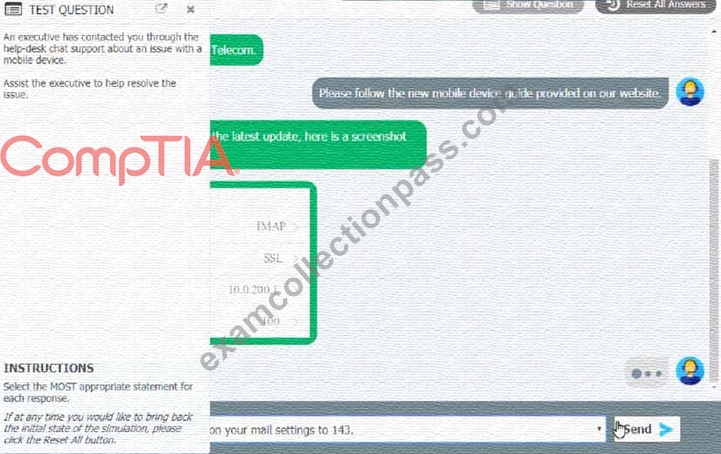
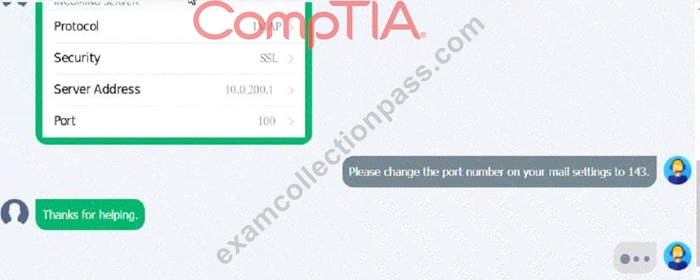
Which of the following should be done NEXT?
- A. Send an email to Telecom to inform them of the Issue and prevent reoccurrence.
- B. Educate the user on the solution that was performed.
- C. Close the ticket out.
- D. Tell the user to take time to fix it themselves next time.
Answer: B
NEW QUESTION # 139
A technician is installing RAM in a new workstation and needs to protect against electrostatic discharge.
Which of the following will best resolve this concern?
- A. ESD strap
- B. Consistent power
- C. Battery backup
- D. Thermal paste
Answer: A
Explanation:
Explanation
An ESD strap, also known as an antistatic wrist strap, is a device that prevents electrostatic discharge (ESD) from damaging sensitive electronic components such as RAM. ESD is the sudden flow of electricity between two objects with different electrical charges, which can cause permanent damage or malfunction to electronic devices. An ESD strap connects the technician's wrist to a grounded surface, such as a metal case or a mat, and equalizes the electrical potential between the technician and the device. Battery backup, thermal paste, and consistent power are not devices that can protect against ESD.
NEW QUESTION # 140
An employee has repeatedly contacted a technician about malware infecting a work computer. The technician has removed the malware several times, but the user's PC keeps getting infected. Which of the following should the technician do to reduce the risk of future infections?
- A. Configure the firewall.
- B. Update the antivirus program.
- C. Educate the end user
- D. Restore the system from backups.
Answer: C
Explanation:
Malware is software that infects computer systems to damage, disable or exploit the computer or network for various malicious purposes5. Malware is typically distributed via email attachments, fake internet ads, infected applications or websites, and often relies on user interaction to execute6. Therefore, one of the most effective ways to prevent malware infections is to educate the end user about the common signs and sources of malware, and how to avoid them7. Configuring the firewall, restoring the system from backups, and updating the antivirus program are also important security measures, but they do not address the root cause of the user's repeated infections, which is likely due to a lack of awareness or caution.
Reference
5: Malware: what it is, how it works, and how to stop it - Norton
6: How to Prevent Malware: 15 Best Practices for Malware Prevention
7: 10 Security Tips for How to Prevent Malware Infections - Netwrix
NEW QUESTION # 141
Malware is installed on a device after a user clicks on a link in a suspicious email. Which of the following is the best way to remove the malware?
- A. Restart the PC.
- B. Schedule a scan.
- C. Place in recovery mode.
- D. Run System Restore.
Answer: C
Explanation:
Explanation
Recovery mode is a special boot option that allows the user to access advanced tools and features to troubleshoot and remove malware from the device. Recovery mode can also restore the system to a previous state or reset the device to factory settings. Running System Restore, scheduling a scan, or restarting the PC may not be effective in removing the malware, as it may still be active or hidden in the system files.
NEW QUESTION # 142
A home office user wants to ensure a PC is backed up and protected against local natural disasters and hardware failures. Which of the following would meet the user's requirements?
- A. Using an agent-based cloud backup solution
- B. Automating backups to a local network share
- C. Implementing a grandfather-father-son backup rotation
- D. Saving files manually to an external drive
Answer: A
NEW QUESTION # 143
An executive has contacted you through the help-desk chat support about an issue with a mobile device.
Assist the executive to help resolve the issue.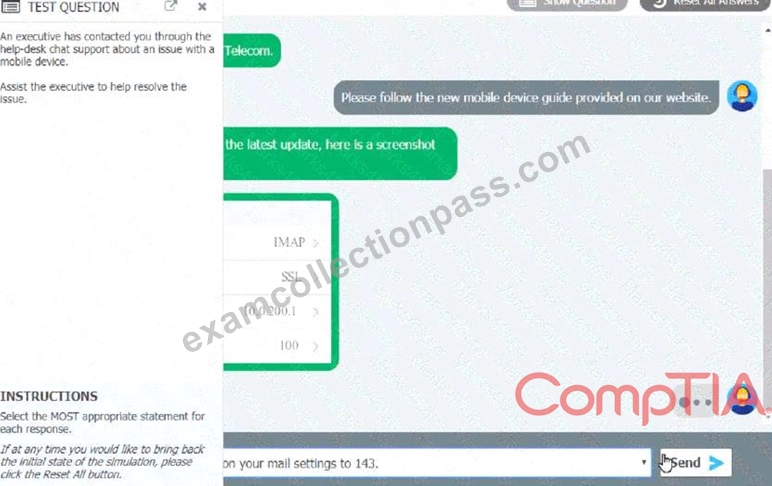
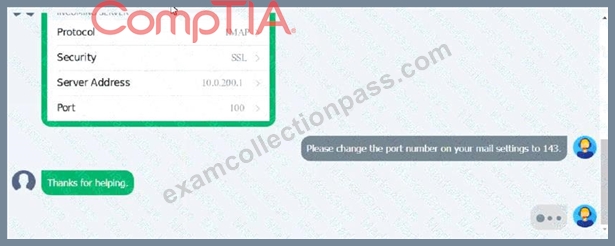
Which of the following should be done NEXT?
- A. Send an email to Telecom to inform them of the Issue and prevent reoccurrence.
- B. Educate the user on the solution that was performed.
- C. Close the ticket out.
- D. Tell the user to take time to fix it themselves next time.
Answer: B
NEW QUESTION # 144
A technician is concerned about a large increase in the number of whaling attacks happening in the industry. The technician wants to limit the company's risk to avoid any issues. Which of the following items should the technician implement?
- A. Firewall
- B. Screened subnet
- C. Anti-phishing training
- D. Antivirus
Answer: C
Explanation:
Anti-phishing training is a method of educating users on how to identify and avoid phishing attacks, which are attempts to trick users into revealing sensitive information or performing malicious actions by impersonating legitimate entities or persons. Whaling attacks are a specific type of phishing attack that target high-level executives or influential individuals within an organization. Anti-phishing training can help users recognize the signs of whaling attacks and prevent them from falling victim to them. Screened subnet, firewall, and antivirus are not items that can directly address the issue of whaling attacks.
NEW QUESTION # 145
A technician is investigating a workstation that has not received the latest policy changes. Which of the following commands should the technician use to apply the latest domain policy changes?
- A. gpupdare /force
- B. chkdsk /y
- C. sfc /scannow
- D. xcopy Zp
Answer: A
Explanation:
When a workstation has not received the latest policy changes, the gpupdate command is used to manually apply the latest group policies from the domain controller.
Option A: sfc /scannow
This command is used to scan and repair corrupted system files, not to update group policies.
Option B: gpupdate /force
This command forces the workstation to reapply all group policies, ensuring that the latest policies are applied immediately.
Option C: chkdsk /y
This command checks the integrity of the file system and fixes logical file system errors, not to update group policies.
Option D: xcopy /Zp
This command is used for copying files and directories, not for updating group policies.
Reference:
CompTIA A+ 220-1102 Objective 1.6 (Configure Microsoft Windows networking features on a client/desktop), particularly managing and applying group policies.
NEW QUESTION # 146
A company needs to securely dispose of data stored on optical discs. Which of the following is the MOST effective method to accomplish this task?
- A. Degaussing
- B. Shredding
- C. Recycling
- D. Low-level formatting
Answer: B
Explanation:
Shredding is the most effective method to securely dispose of data stored on optical discs12 References: 4. How Can I Safely Destroy Sensitive Data CDs/DVDs? - How-To Geek. Retrieved from
https://www.howtogeek.com/174307/how-can-i-safely-destroy-sensitive-data-cdsdvds/ 5. Disposal - UK Data Service. Retrieved from https://ukdataservice.ac.uk/learning-hub/research-data-management/store-your- data/disposal/
NEW QUESTION # 147
A technician is troubleshooting a PC that will not run Windows Defender. Windows Defender has been disabled, and no other antivirus is installed on the PC. Which of the following would have caused this issue?
- A. Rootkit
- B. Ransomware
- C. Keylogger
- D. Spyware
Answer: A
Explanation:
Rootkits are particularly dangerous because they modify the operating system to hide their presence and can disable antivirus software like Windows Defender. Ransomware (A) encrypts files, but usually does not disable antivirus software. Spyware (C) and Keyloggers (D) typically do not directly disable antivirus programs either.
NEW QUESTION # 148
Which of the following Windows 10 editions is the most cost-effective and appropriate for a single user who needs to access their computer remotely?
- A. Education
- B. Home
- C. Pro
- D. Enterprise
Answer: C
Explanation:
For a single user who needs to access their computer remotely, the Windows 10 Pro edition is the most cost-effective and appropriate choice. It includes features such as Remote Desktop, which are essential for remote access.
* Option A: EducationThis edition is designed for academic institutions and includes educational features. It is not the most cost-effective for a single user.
* Option B: ProWindows 10 Pro includes Remote Desktop and other business features. It is suitable and cost-effective for single users needing remote access.
* Option C: EnterpriseThis edition includes advanced features for large organizations and is more expensive, making it less cost-effective for a single user.
* Option D: HomeWhile cost-effective, Windows 10 Home does not include the Remote Desktop feature, making it unsuitable for this requirement.
References:
* CompTIA A+ 220-1102 Objective 1.1 (Identify basic features of Microsoft Windows editions), particularly comparing editions based on features and cost.
NEW QUESTION # 149
An implementation specialist is replacing a legacy system at a vendor site that has only one wireless network available. When the specialist connects to Wi-Fi. the specialist realizes the insecure network has open authentication. The technician needs to secure the vendor's sensitive dat a. Which of the following should the specialist do FIRST to protect the company's data?
- A. Change the network location to private.
- B. Connect to the vendor's network using a VPN.
- C. Manually configure an IP address, a subnet mask, and a default gateway.
- D. Configure MFA on the network.
Answer: B
Explanation:
The first thing that the specialist should do to protect the company's data on an insecure network with open authentication is to connect to the vendor's network using a VPN. A VPN stands for Virtual Private Network and is a technology that creates a secure and encrypted connection over a public or untrusted network. A VPN can protect the company's data by preventing eavesdropping, interception or modification of the network traffic by unauthorized parties. A VPN can also provide access to the company's internal network and resources remotely. Manually configuring an IP address, a subnet mask and a default gateway may not be necessary or possible if the vendor's network uses DHCP to assign network configuration parameters automatically. Manually configuring an IP address, a subnet mask and a default gateway does not protect the company's data from network attacks or threats. Changing the network location to private may not be advisable or effective if the vendor's network is a public or untrusted network. Changing the network location to private does not protect the company's data from network attacks or threats. Configuring MFA on the network may not be feasible or sufficient if the vendor's network has open authentication and does not support or require MFA. Configuring MFA on the network does not protect the company's data from network attacks or threats. Reference: CompTIA A+ Core 2 (220-1002) Certification Exam Objectives Version 4.0, Domain 3.3
NEW QUESTION # 150
An administrator has submitted a change request for an upcoming server deployment. Which of the following must be completed before the change can be approved?
- A. Risk analysis
- B. End user acceptance
- C. Lessons learned
- D. Sandbox testing
Answer: A
Explanation:
Explanation
Risk analysis is the process of identifying and evaluating the potential threats and impacts of a change on the system, network, or service. It is an essential step before approving a change request, as it helps to determine the level of risk, the mitigation strategies, and the contingency plans. Risk analysis also helps to prioritize the change requests based on their urgency and importance12.
References: 1 The Change Request Process and Best
Practices(https://www.processmaker.com/blog/it-change-request-process-best-practices/)2 Risk Assessment and Analysis Methods: Qualitative and Quantitative(https://www.isaca.org/resources/isaca-journal/issues/2021/volume-2/risk-assessment-and-analysis-m
NEW QUESTION # 151
A user purchased a netbook that has a web-based, proprietary operating system. Which of the following operating systems is MOST likely installed on the netbook?
- A. Linux
- B. macOS
- C. Windows
- D. Chrome OS
Answer: D
Explanation:
4. Chrome OS. Retrieved from https://en.wikipedia.org/wiki/Chrome_OS 5. What is Chrome OS? Retrieved from https://www.google.com/chromebook/chrome-os/ A netbook with a web-based, proprietary operating system is most likely running Chrome OS. Chrome OS is a web-based operating system developed by Google that is designed to work with web applications and cloud storage. It is optimized for netbooks and other low-power devices and is designed to be fast, secure, and easy to use.
NEW QUESTION # 152
A department manager submits a help desk ticket to request the migration of a printer's port utilization from USB to Ethernet so multiple users can access the printer. This will be a new network printer; thus a new IP address allocation is required. Which of the following should happen immediately before network use is authorized?
- A. Submit a change request form.
- B. Determine the risk level of this change.
- C. Request an unused IP address.
- D. Document the date and time of the change.
Answer: C
Explanation:
Explanation
An IP address is a unique identifier that allows a device to communicate with other devices on a network. A network printer needs an IP address to be accessible by multiple users on the network. Requesting an unused IP address from the network administrator or using an IP address scanner is the step that should happen immediately before network use is authorized, as it ensures that there is no IP address conflict or duplication on the network. Documenting the date and time of the change, submitting a change request form, and determining the risk level of this change are steps that should happen before requesting an unused IP address.
NEW QUESTION # 153
A wireless network is set up, but it is experiencing some interference from other nearby SSIDs. Which of the following can BEST resolve the interference?
- A. Disabling the SSIO broadcast
- B. Modifying the wireless security
- C. Changing channels
- D. Changing the access point name
Answer: C
Explanation:
Explanation
Changing channels can best resolve interference from other nearby SSIDs. Wireless networks operate on different channels, and changing the channel can help to avoid interference from other nearby networks.
NEW QUESTION # 154
Which of the following operating systems would most likely be used to run the inventory management system at a factory?
- A. iOS
- B. Android
- C. Windows
- D. Chrome OS
Answer: C
Explanation:
Windows is widely used in industrial and business environments due to its major market presence, extensive support from the industry, and a broad selection of operating system options. It supports a wide variety of software, making it suitable for running complex systems like an inventory management system in a factory. Other options such as Chrome OS, Android, and iOS are either more consumer-oriented or designed for specific types of devices, making them less likely choices for an industrial application like inventory management.
Reference: Professor Messer's CompTIA 220-1102 A+ Course Notes.
NEW QUESTION # 155
A user reports a computer is running slow. Which of the following tools will help a technician identify the issue?
- A. Group Policy Editor
- B. Disk Cleanup
- C. Resource Monitor
- D. Disk Management
Answer: C
Explanation:
Resource Monitor is a Windows utility that can be used to monitor and analyze the system resources and processes running on a computer. It can be used to identify and troubleshoot any issues that might be causing the computer to run slowly, such as CPU usage, memory usage, disk I/O, and network usage.
NEW QUESTION # 156
Ann, a CEO, has purchased a new consumer-class tablet for personal use, but she is unable to connect it to the company's wireless network. All the corporate laptops are connecting without issue. She has asked you to assist with getting the device online.
INSTRUCTIONS
Review the network diagrams and device configurations to determine the cause of the problem and resolve any discovered issues.
If at any time you would like to bring back the initial state of the simulation, please click the Reset All button.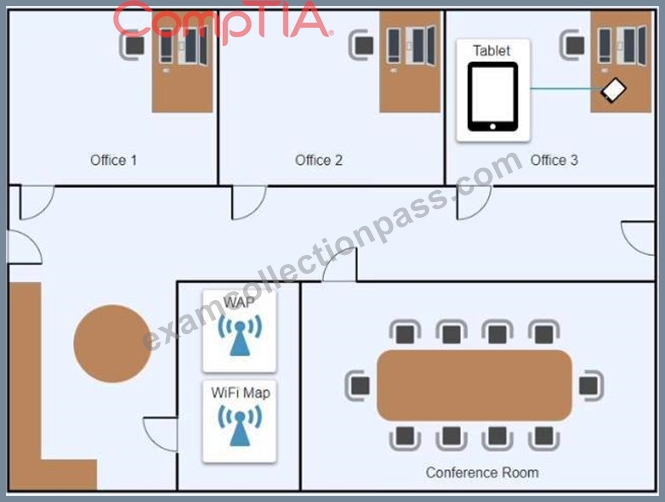
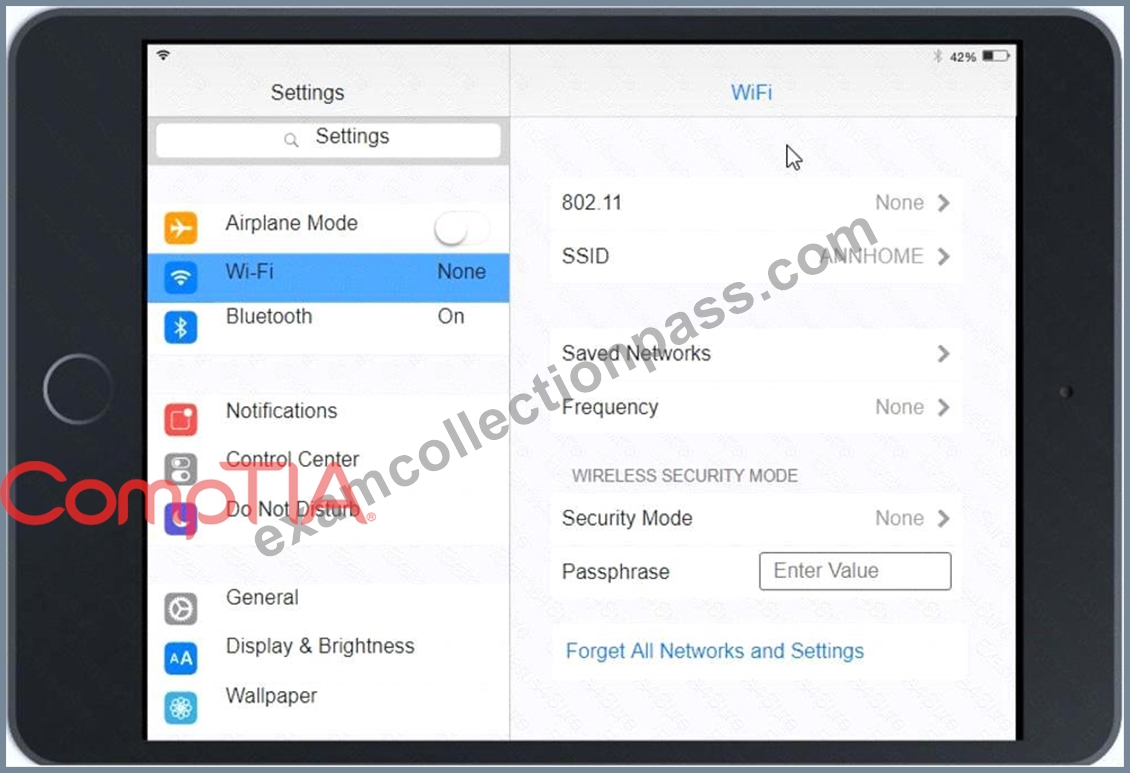
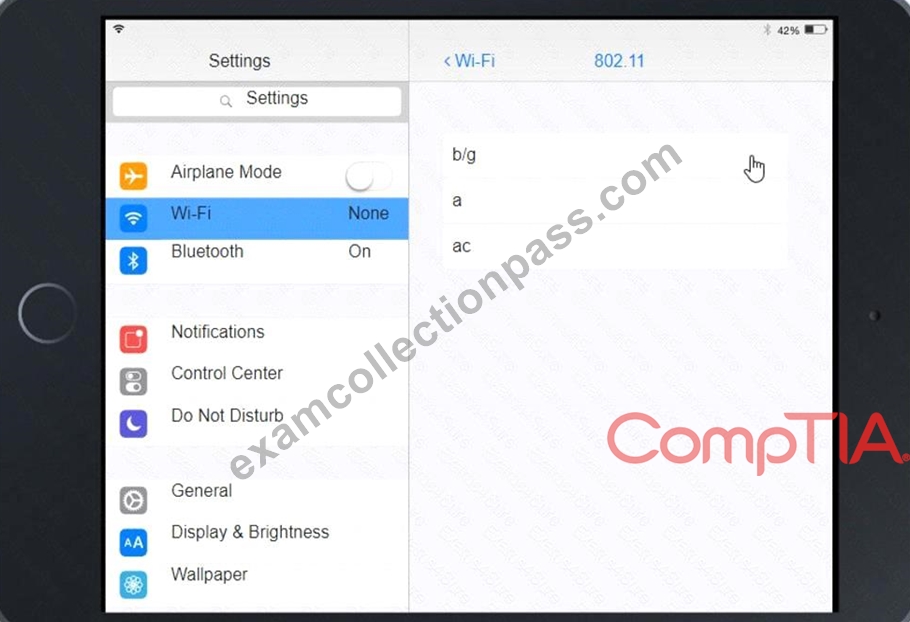
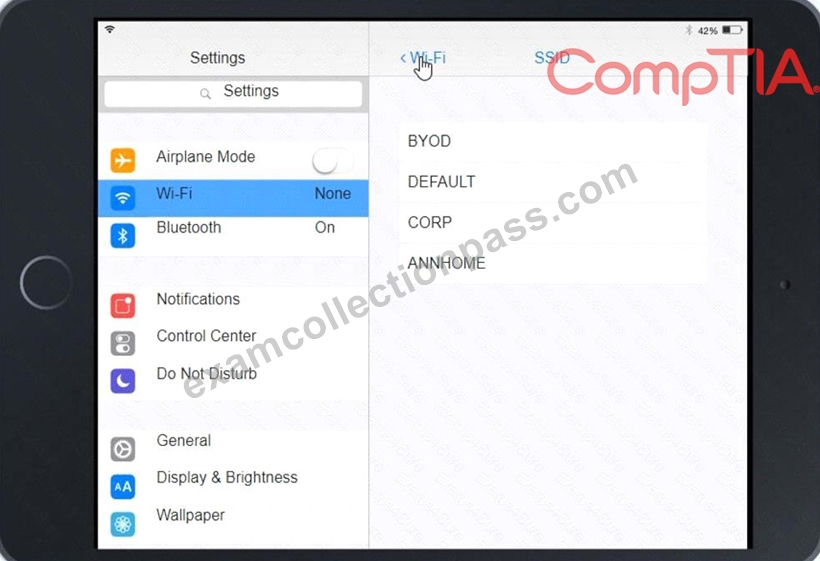
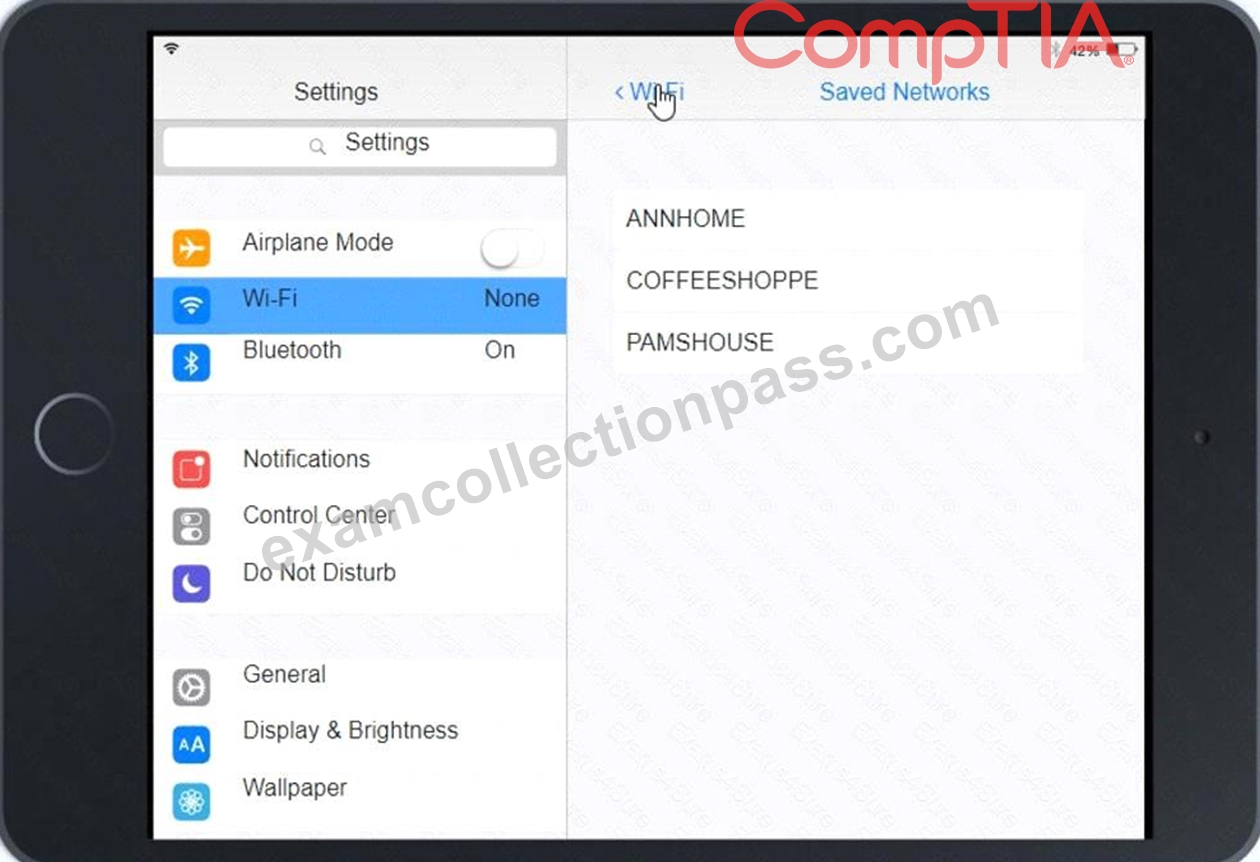
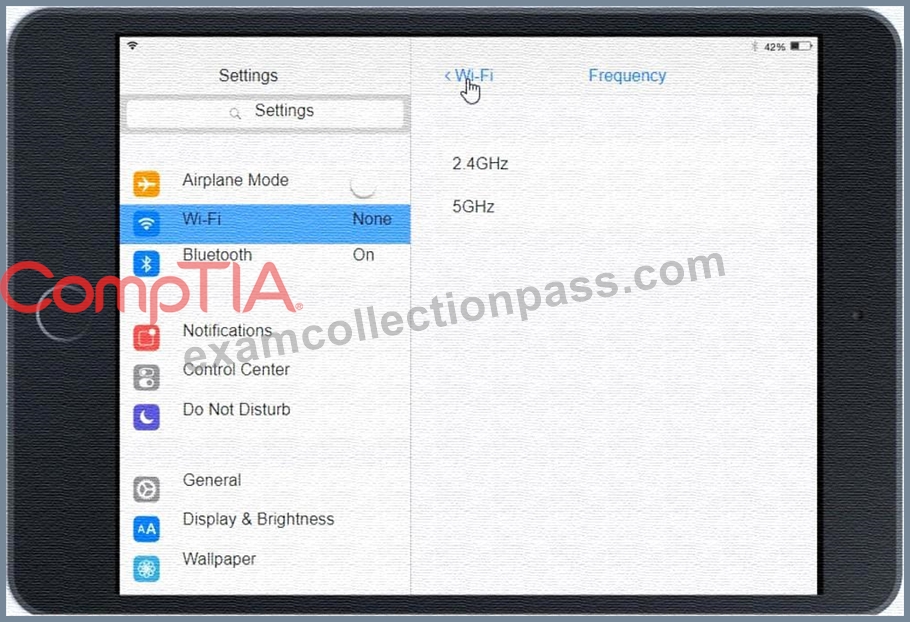
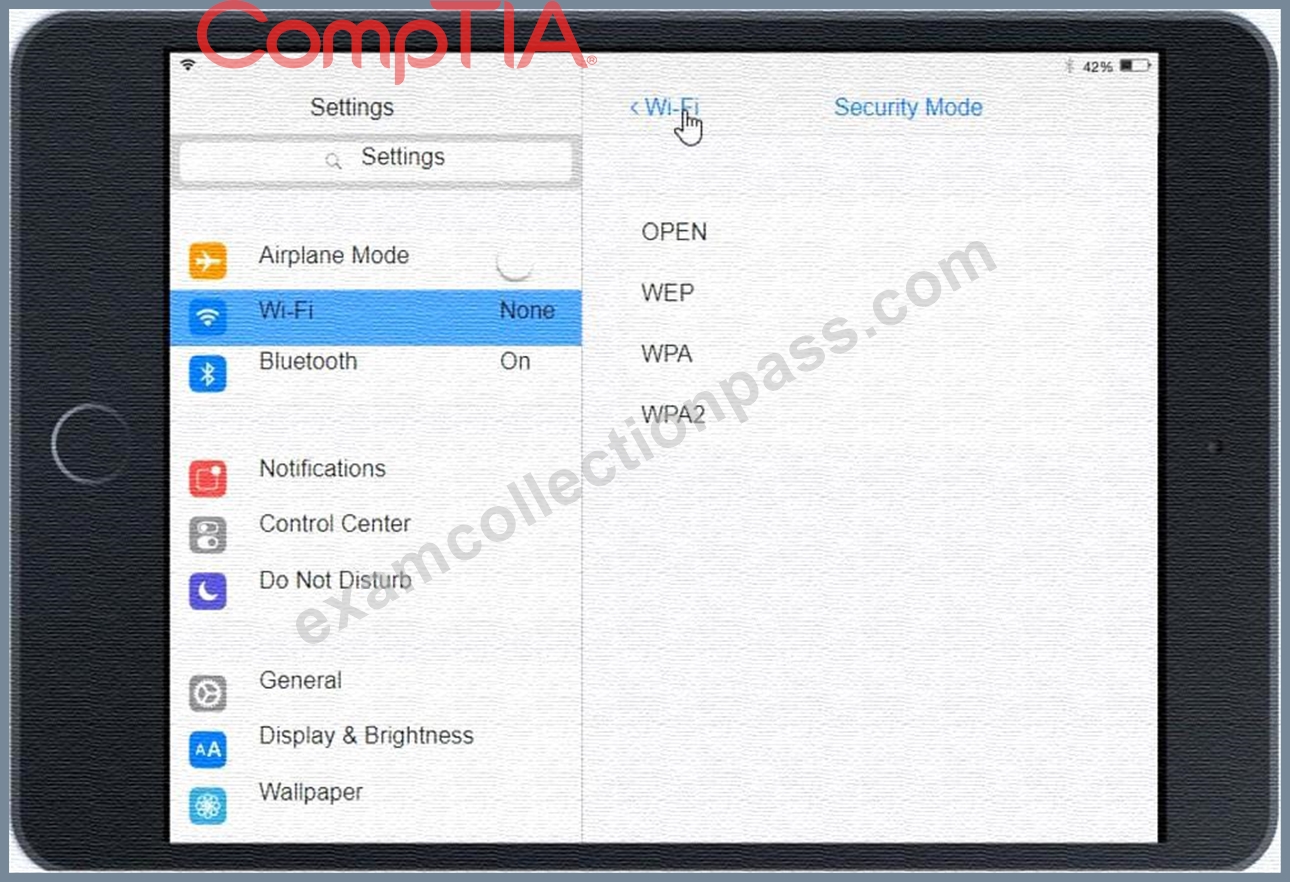
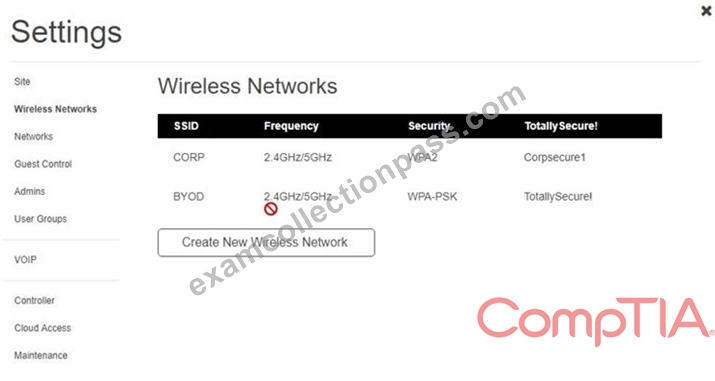
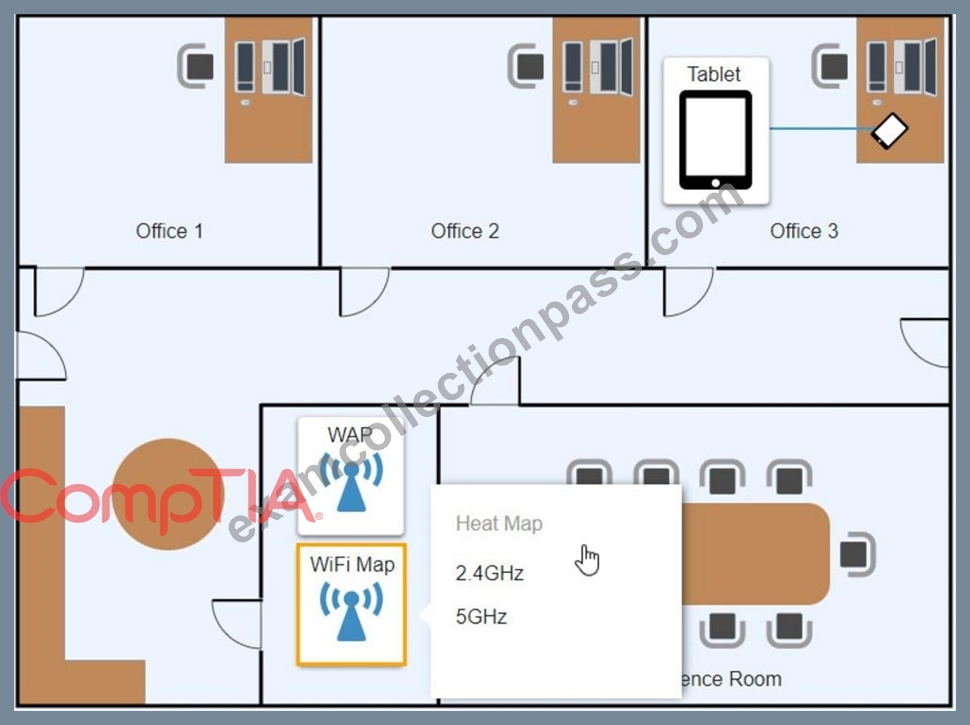
Answer:
Explanation:
See the Explanation below:
Explanation
Graphical user interface, application Description automatically generated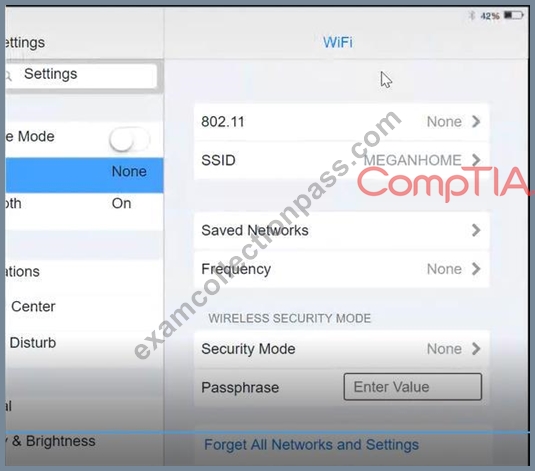
Click on 802.11 and Select ac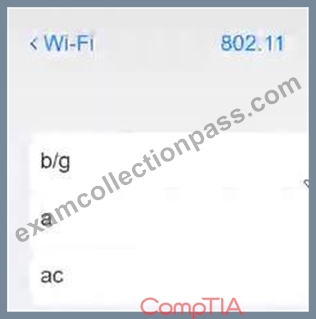
Graphical user interface, application Description automatically generated Click on SSID and select CORP Graphical user interface, text, application, Teams Description automatically generated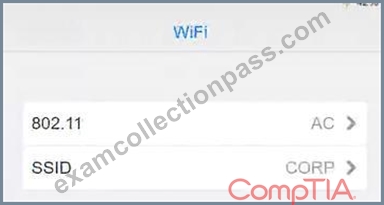
Click on Frequency and select 5GHz
A picture containing background pattern Description automatically generated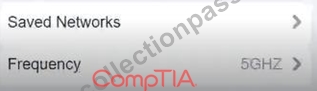
At Wireless Security Mode, Click on Security Mode
Graphical user interface, text, application Description automatically generated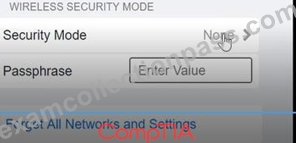
Select the WPA2
Graphical user interface, application, Teams Description automatically generated with medium confidence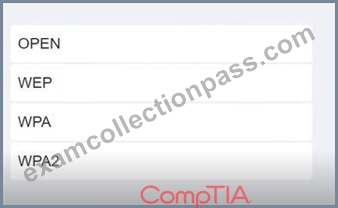
Ann needs to connect to the BYOD SSID, using 2.4GHZ. The selected security method chose should be WPA PSK, and the password should be set to TotallySecret.
Graphical user interface, application Description automatically generated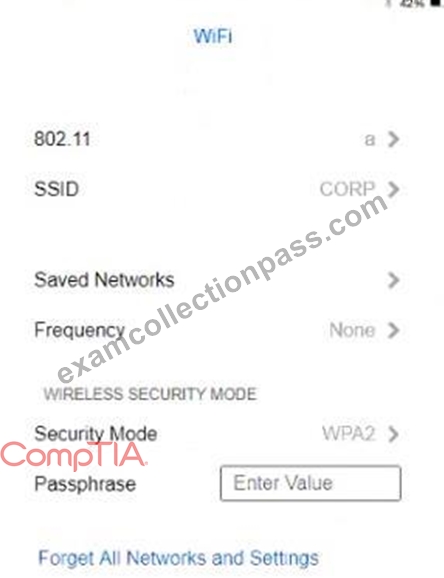
NEW QUESTION # 157
As a corporate technician, you are asked to evaluate several suspect email messages on a client's computer.
Corporate policy requires he following:
* All phishing attempts must be reported.
* Future spam emails to users must be prevented.
INSTRUCTIONS
Review each email and perform the following within the email:
* Classify the emails
* Identify suspicious items, if applicable, in each email
* Select the appropriate resolution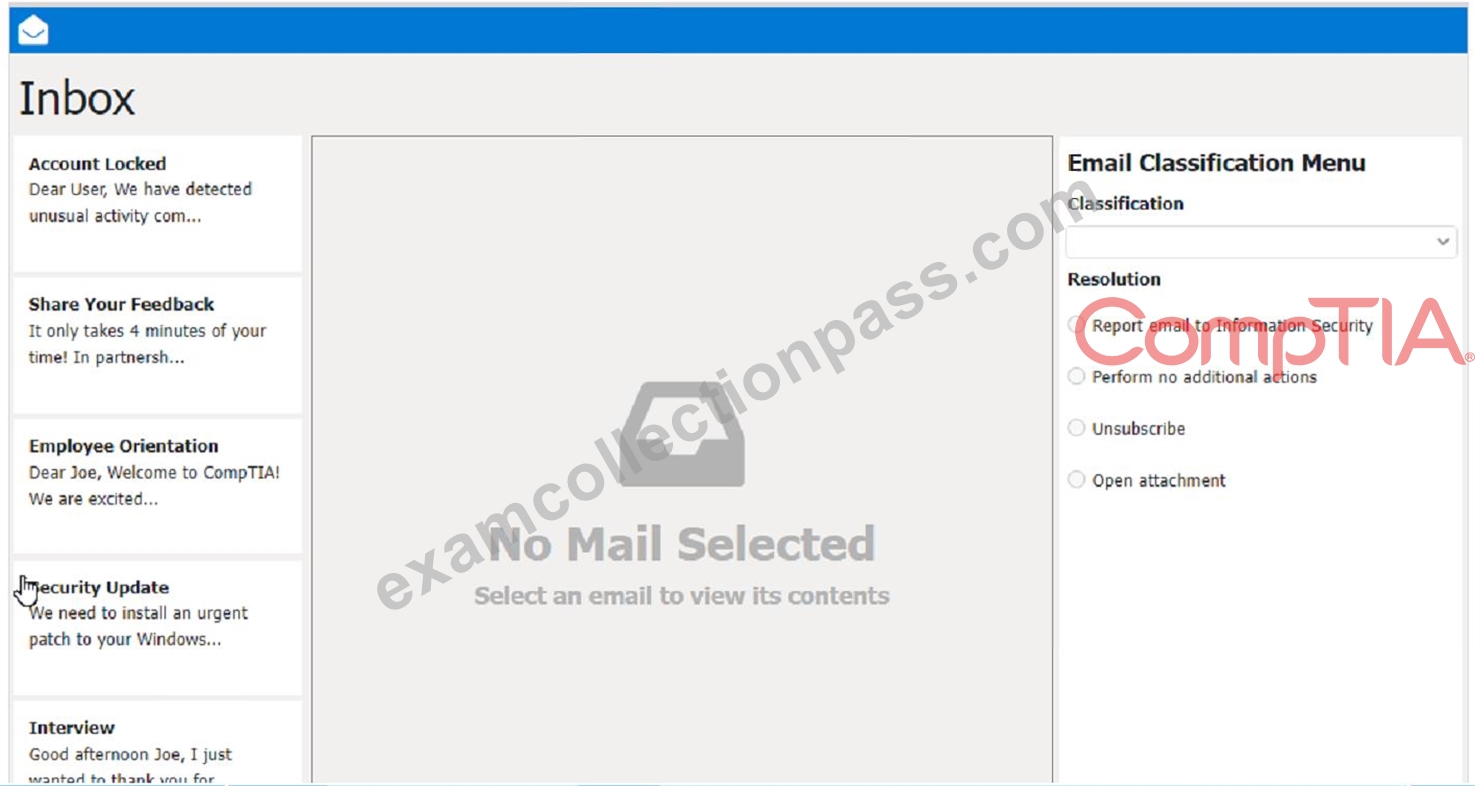
- A. Report email to Information Security. The user should not click on the link, reply to the email, or provide any personal or account information. The user should forward the email to the Information Security team or use a professional email form to report the phishing attempt. The user should also delete the email from their inbox and trash folder.
The suspicious items to select are:
b) From address
d) Hyperlinks
These items indicate that the email is not from a legitimate source and that the link is potentially malicious. The other items are not suspicious in this case, as the to address is the user's own email and there are no attachments.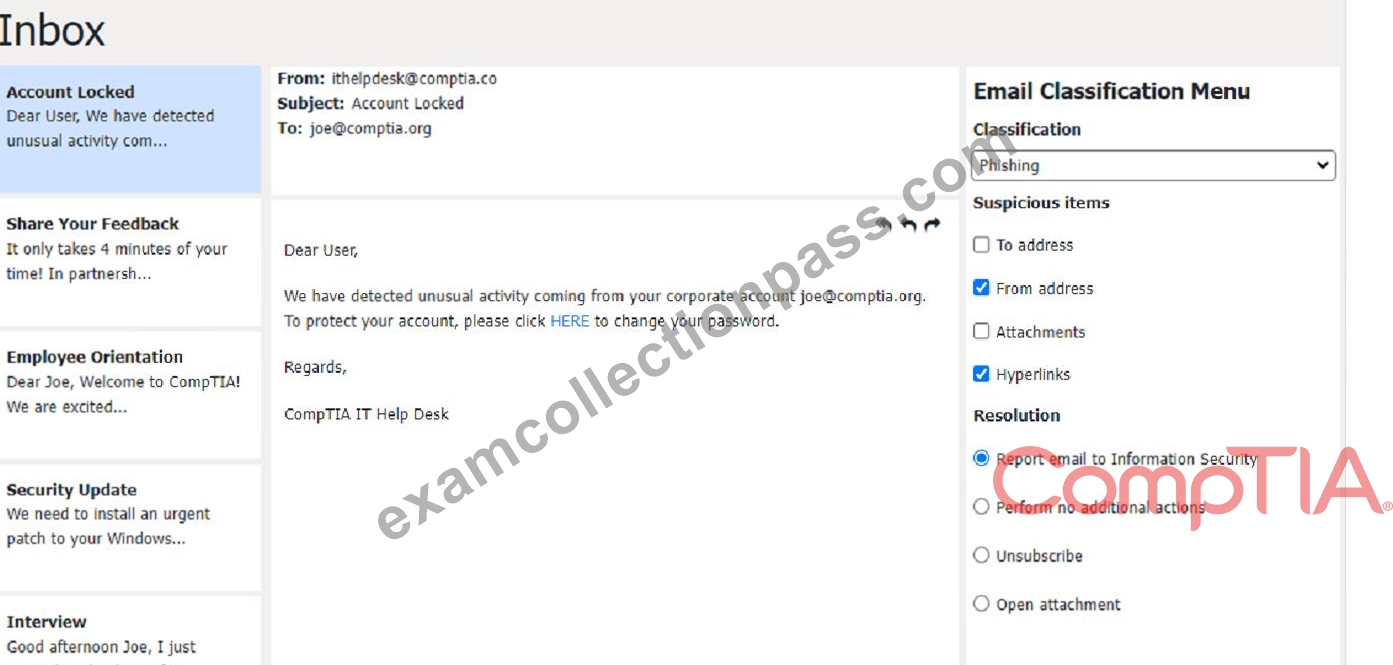
Classification: b) Spam
This email is a spam email, as it is an unsolicited and unwanted message that tries to persuade the user to participate in a survey and claim a reward. Some suspicious items in this email are:
The email offers a free wireless headphone as an incentive, which is too good to be true.
The email does not provide any details about the survey company, such as its name, address, or contact information.
The email contains an external survey link, which may lead to a malicious or fraudulent website.
The email does not have an unsubscribe option, which is required by law for commercial emails.
The appropriate resolution for this email is C. Unsubscribe. The user should look for an unsubscribe link or button at the bottom of the email and follow the instructions to opt out of receiving future emails from the sender. The user should also mark the email as spam or junk in their email client, which will help filter out similar emails in the future. The user should not click on the survey link, reply to the email, or provide any personal or financial information.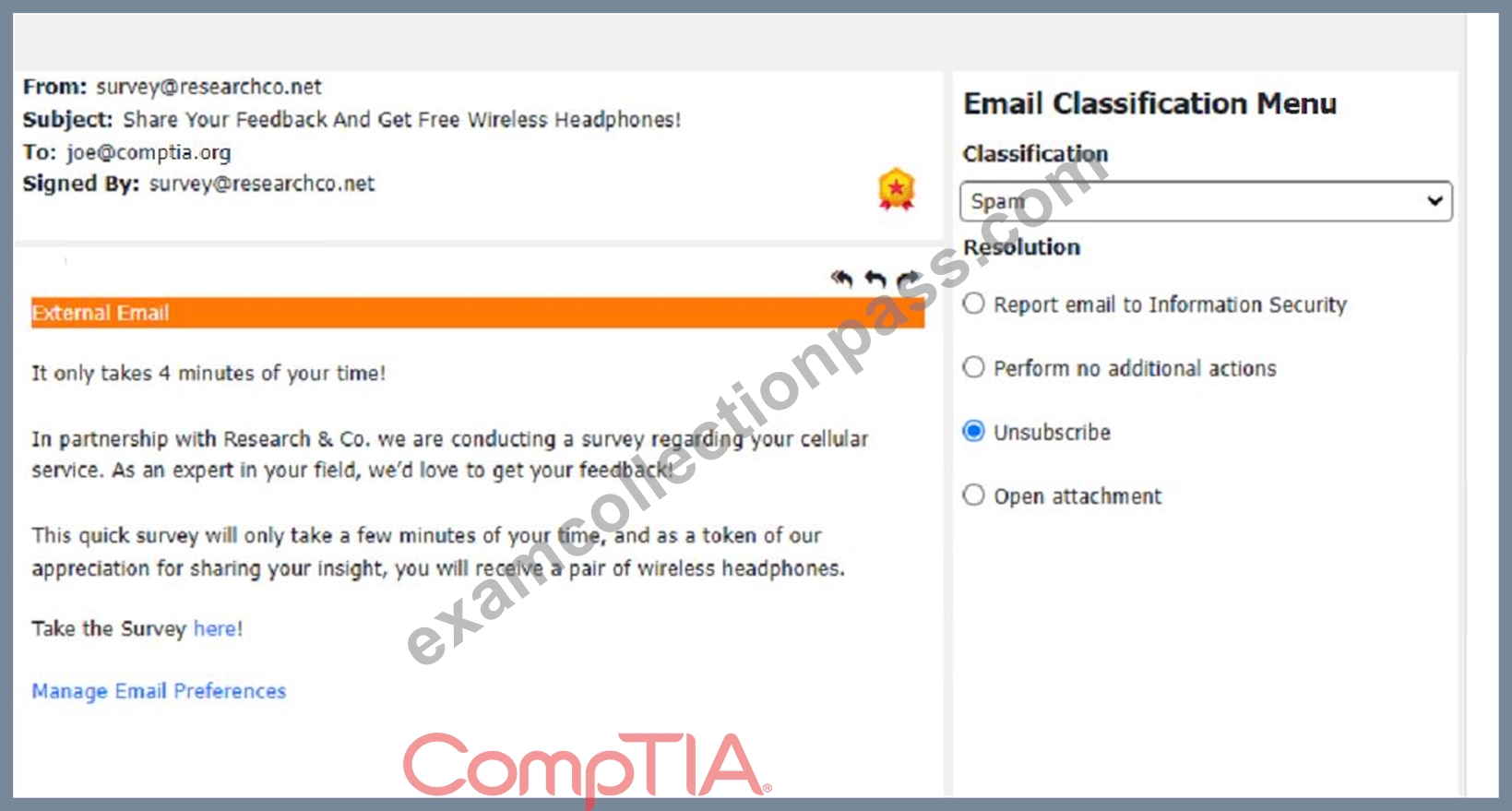
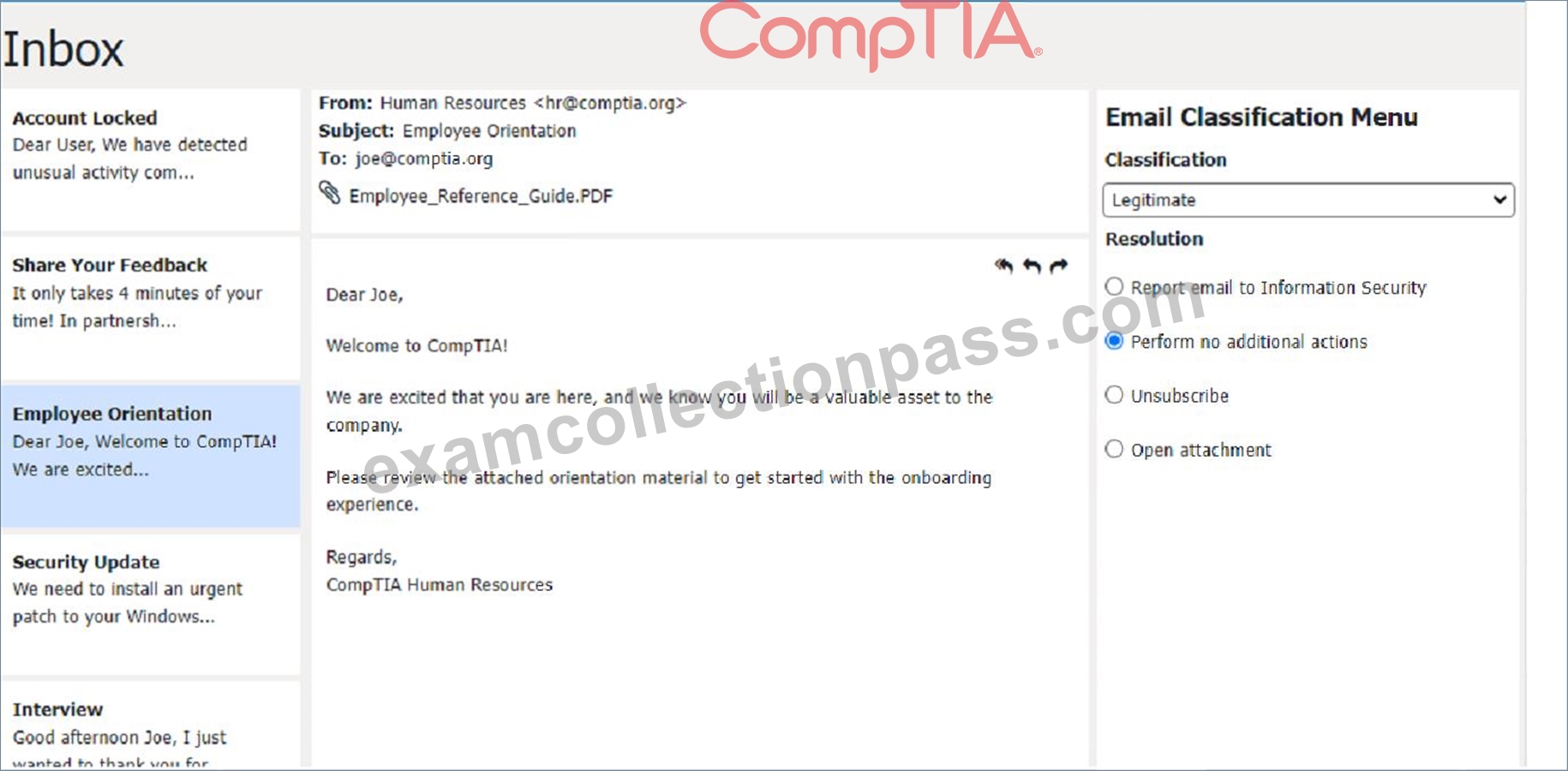
Classification: c) Legitimate
This email is a legitimate email, as it is from a trusted source and has a valid purpose. There are no suspicious items in this email, as the from address, the to address, the attachment, and the email body are all consistent and relevant. The appropriate resolution for this email is B. Perform no additional actions. The user can open the attachment and review the orientation material as instructed. The user does not need to report, unsubscribe, or delete this email.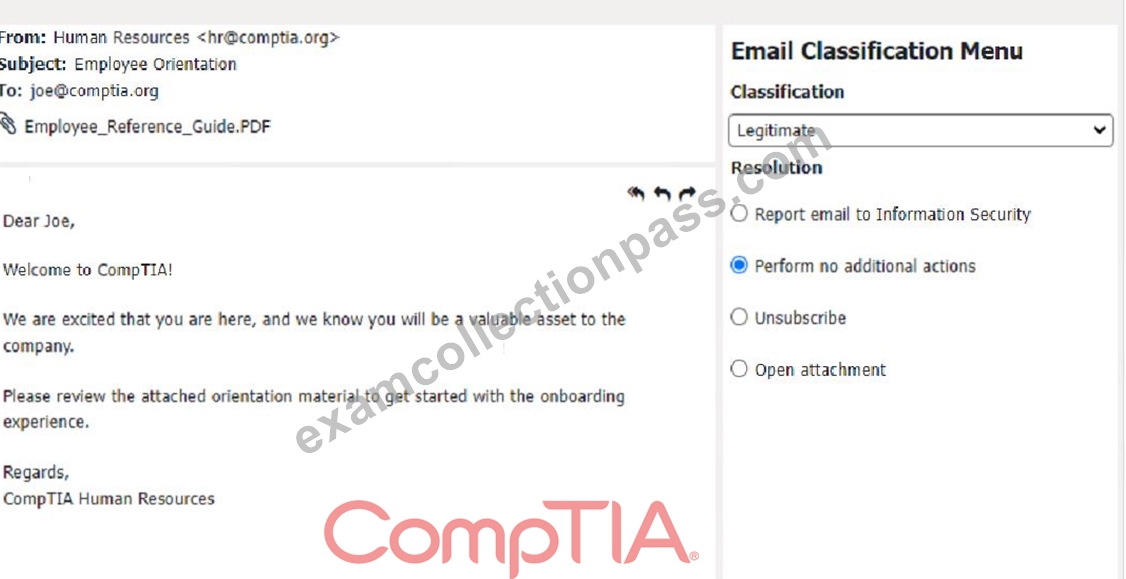
Classification: a) Phishing
This email is a phishing attempt, as it tries to deceive the user into downloading and running a malicious attachment that could compromise their system or data. Some suspicious items in this email are:
The email has a generic greeting and does not address the user by name or username.
The email has an urgent tone and claims that a security patch needs to be installed immediately.
The email has an attachment named "patch1.exe", which is an executable file that could contain malware or ransomware.
The email does not match the official format or domain of CompTIA Information Security.
The appropriate resolution for this email is A. Report email to Information Security. The user should not open the attachment, reply to the email, or provide any personal or account information. The user should forward the email to the Information Security team or use a professional email form to report the phishing attempt. The user should also delete the email from their inbox and trash folder.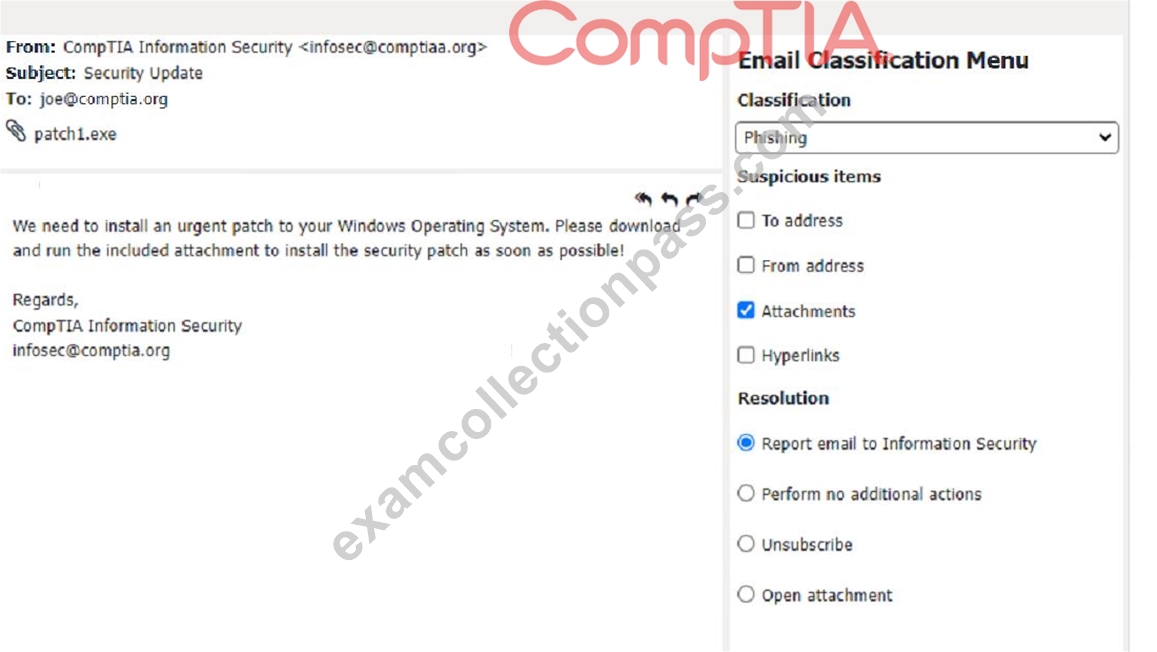
Classification: c) Legitimate
This email is a legitimate email, as it is from a trusted source and has a valid purpose. There are no suspicious items in this email, as the from address, the to address, and the email body are all consistent and relevant.
The appropriate resolution for this email is B.
Perform no additional actions. The user can reply to the email and thank the sender for the interview opportunity. The user does not need to report, unsubscribe, or delete this email.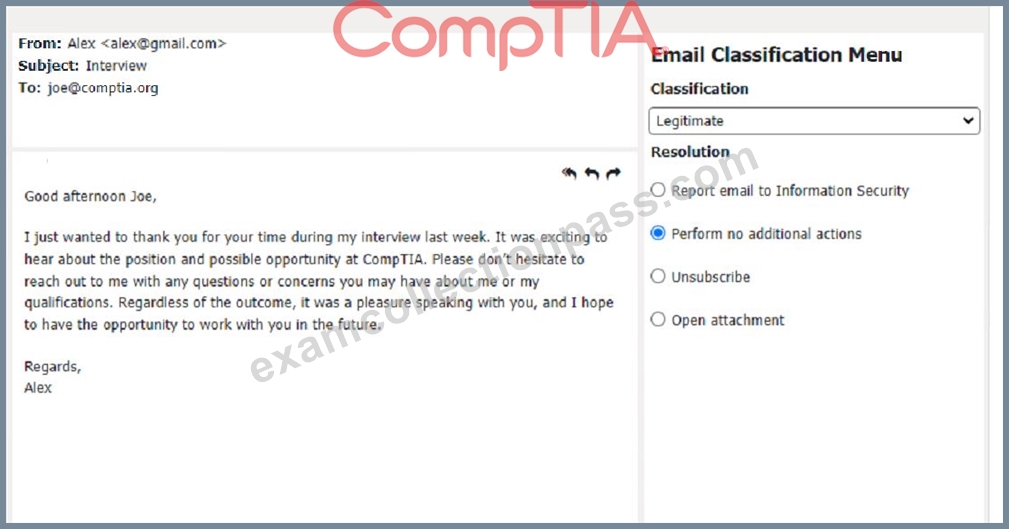
Answer:
Explanation:
Classification: a) Phishing
This email is a phishing attempt, as it tries to trick the user into clicking on a malicious link that could compromise their account or personal information. Some suspicious items in this email are:
The email has a generic greeting and does not address the user by name.
The email has spelling errors, such as "unusal" and "Locaked".
The email uses a sense of urgency and fear to pressure the user into clicking on the link.
The email does not match the official format or domain of the IT Help Desk at CompTIA.
The email has two black bat icons, which are not related to CompTIA or IT support.
The appropriate resolution for this email is
NEW QUESTION # 158
Welcome to your first day as a Fictional Company. LLC helpdesk employee. Please work the tickets in your helpdesk ticket queue.
Click on individual tickers to see the ticket details. View attachments to determine the problem.
Select the appropriate issue from the 'issue' drop-down menu. Then, select the MOST efficient resolution from the 'Resolution' drop-down menu. Finally, select the proper command or verification to remediate or confirm your fix of the issue from the Verify Resolve drop-down menu.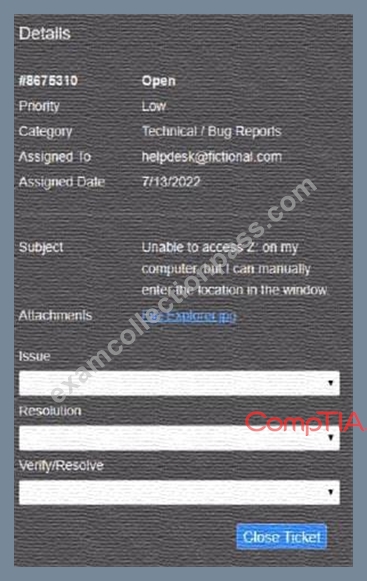
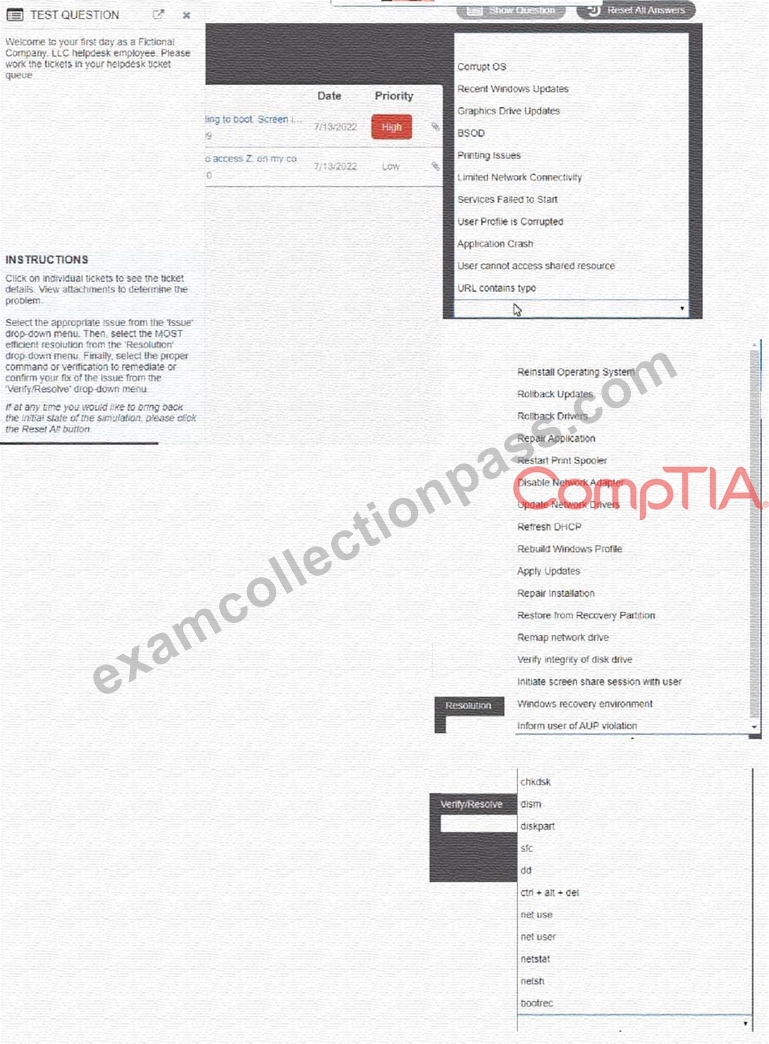
Answer:
Explanation: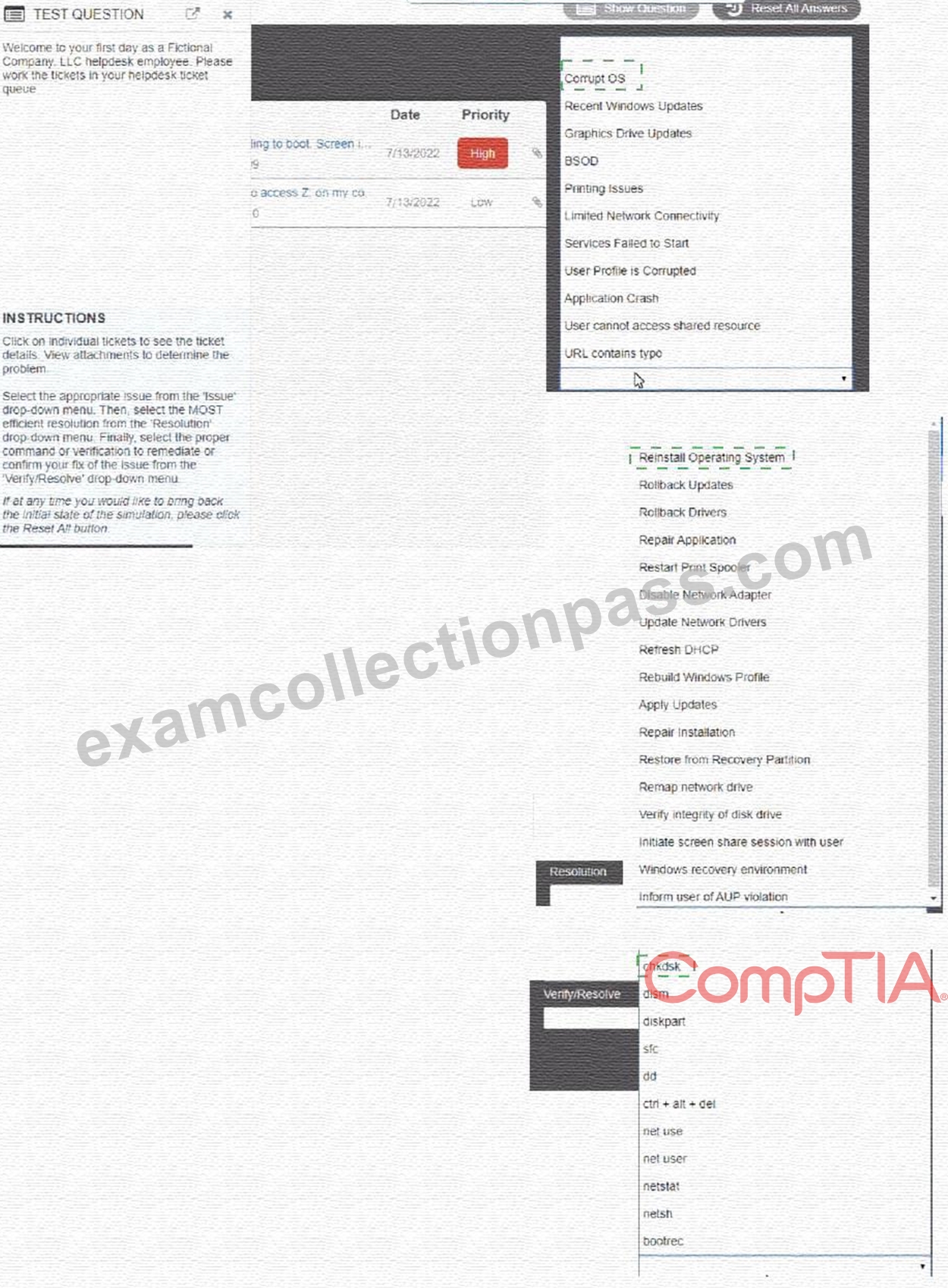
Explanation: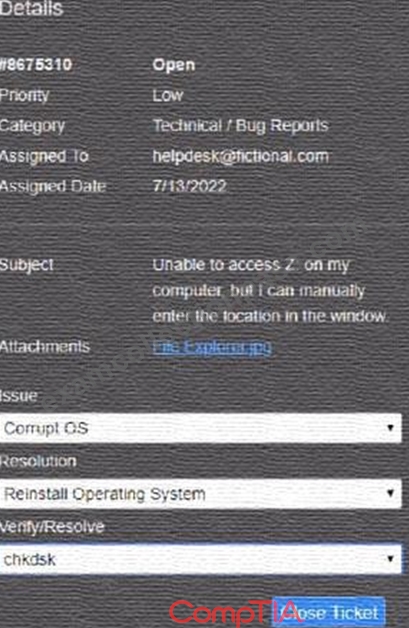
NEW QUESTION # 159
......
2025 New ExamcollectionPass 220-1102 PDF Recently Updated Questions: https://www.examcollectionpass.com/CompTIA/220-1102-practice-exam-dumps.html
220-1102 Exam with Guarantee Updated 781 Questions: https://drive.google.com/open?id=1BDTu6NrVoD1pivZx_3zWxgJS4a36iuVG